Telkom University Student Resignation Guide
For students who wish to withdraw from Telkom University campus, please pay attention to the following points. Withdrawal applications can only be submitted during specific period In accordance with the date set by the Academic Department of Telkom University, I have completed the payment obligations and library clearance.
Therefore, students are expected to Ensure that the submission is made within the applicable timeframe. In addition, all administrative requirements and supporting documents must be fully and correctly met to ensure a smooth resignation application process.
Telkom University Student Resignation Guide
Telkom University student withdrawal applications are submitted through the website Thank you. Here is the Guide for Applying for Withdrawal as a Telkom University Student
1. Access website Thank you Telkom University through the browser. Then log in with your SSO account
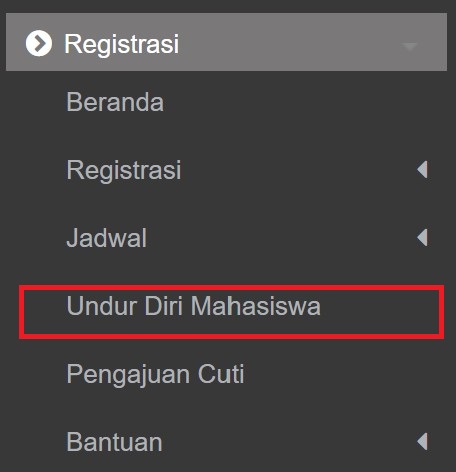
2. Access menu Registration > Student Self-Reflection
3. Click the button “Student Resignation Input” located in the top right corner of the page.

4. Complete the entire Resignation Request Form with the appropriate data Save

- Select resignation category according to the reason for the request: Example of changing universities
- Upload relevant supporting documents, such as:
- Medical certificate
- Job acceptance letter or other college admission
- Certificate of low income
- Certificate of Domicile Relocation
- Other supporting documents
5. Print application letter with a click of the icon Print in the application column.

6. Printed documents are mandatory signed by student, signed by parentsand equipped with stamp duty
7. Scan document which has been signed and stamped.
8. Re-upload via the submission page by clicking the icon Upload.

9. The physical document was handed over to the Faculty LAA department. each. For verification purposes, please bring Student ID Card Dan Parent/Guardian ID card and performed during business hours.
